

Welcome to AUDIO INPUT!

Dec 18, 2021 9:37 AM

Welcome to AUDIO INPUT!
AUDIO INPUT is a community-driven social media platformfor Music Industry Professionals and Fans.
Browse and subscribe to Topics related to your interests and discover music releases, videos, professional services, resources, news, events and so much more.
Connect with the community by posting your own customisable content, rich with media and options, giving you powerful editing tools in an easy-to-use format.
Add Posts, Articles, Polls, Photos, and Questions
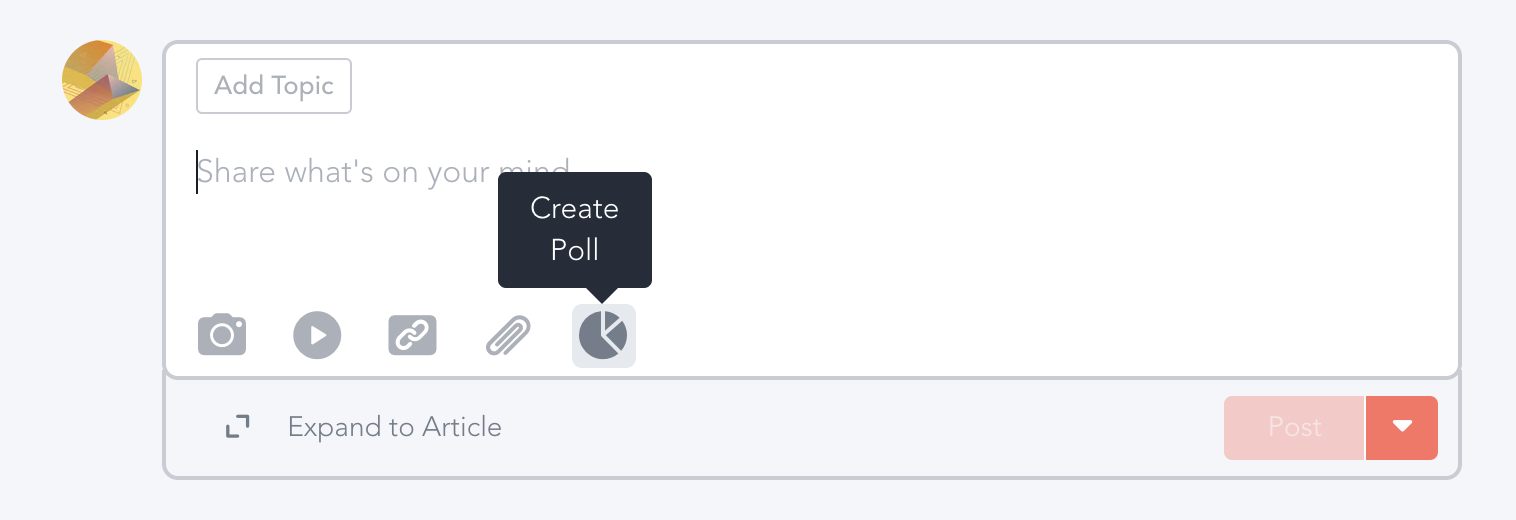
When you click into the main box on the Home screen, you'll get different options from adding a post to uploading a photo, embedding a video or track (via a link), sharing a link or a file, or creating a poll.
There are different kinds of polls, all of which are awesome––including multiple choice, hot/cold and percentage based (great for how you and others feel about something).
You can also click the "Expand to Article" to create longer posts and embed multiple tracks, photos/Videos, etc, by simply clicking the "+" icon when you make a new line.
Select text to adjust formatting, alignment, hyperlinks and more to help you customise your post even more.
- Easily add tracks, playlists, images/videos and links to your post.
- Create polls, prompts, and questions to engage with your fellow music enthusiasts.
- We've got topics to organise content on Audio Input. When creating a post simply choose a topic that best suits your content and also subscribe to those that interest you to filter your general newsfeed. (Let us know if there are any topics you would like to add to the list, in the comments below.)
- You can direct message. You can also post and have threaded conversations.
- We can organise virtual sessions and events on request and can keep conversations and messaging going before, during, and after your event.

Edit your profile
Feel free to customise your profile by uploading a photo and banner. List your profession or make something up that encapsulates you or your music tastes. Add your mini-bio or a quick introduction to welcome new followers and connections.
You can do this by choosing Edit on your Profile.
Adjust Your Notifications
Adjust your sound alerts and notifications you receive over email or mobile at any time. To tweak them, click on your pic in the upper right hand corner, choose Your Settings, and click Notifications.
Comment, Reply, and Contribute to other people's Posts and Questions
Just like other social media platforms you can reply and comment on all posts to join the conversation. Try to keep things friendly and positive, we all have opinions and there is always a bridge to be made between different perspectives. Any hateful and aggressive content will be removed and members banned if necessary.
Go ahead. Share your answer, say hey, or if you're in a hurry, click the cheer button.
Use Topics
You'll be prompted to add your posts to a Topic. Go for it. They are here to help us keep things a bit organized. If you have recommendations for other Topics for us to add, let us know in the comments below.

Get the App on your Phone
To get the iOS or Android app, go to Your Settings, and text yourself the app. Alternatively, download the Mighty Networks app from the Apple App or Google Play Stores, search for AUDIO INPUT, and sign in again.
We will be launching our full app soon on Google, Apple and Huawei app stores.
Thank You for Joining the Community
We're creating something special with AUDIO INPUT. Please share the platform with all your people, be quick to support other members, and resist the temptation to troll or judge. We're doing something different here and it's an honour to have you and your input here!
❤️
2
Comments

Powered by RoundtableBuilt on infrastructure designed for real-time media. Learn more at RTB.io.© Roundtable 2026. By using this site you agree to the Terms of Use and Privacy Policy